GPS Location #
In this section you can display the location of the child device directly on an integrated Google Maps view.
Prerequisites
One-time Locate
Inaccurate Location?
Location History
Missing Location Permission?
Prerequisites #
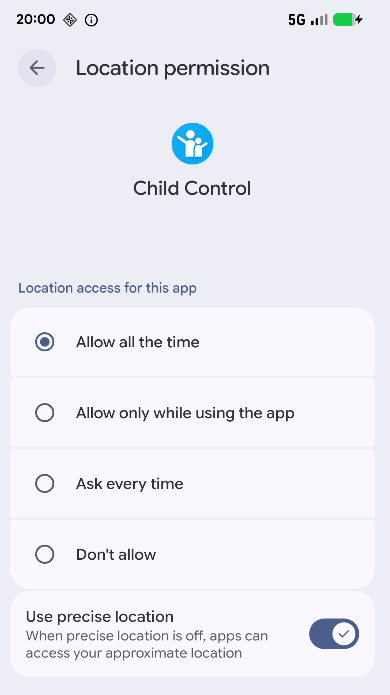
The Child Control app on the child device requires permission to access the location. On newer Android versions, the option “Always allow” must be selected. Additionally, location must not be globally disabled on the device (e.g. via the icon in the notification bar). The device also needs an active internet connection (Wi-Fi or mobile data).
One-time Locate #
The one-time query retrieves the current location of the device. If the displayed location does not appear up to date, you can simply run the location query again.

Inaccurate Location? #
If the displayed location is consistently off by several hundred meters or even kilometers, the following step has helped many users:
Open Settings → Apps → Child Control → Permissions → Location on the child device, disable the location permission, and then re-enable it. Check afterwards whether the location is now more accurate.
Since Android 12, the system can also restrict location access so that only an approximate location is allowed. Check this setting directly on the child device if needed.
Location History #
In addition to the one-time query, the Child Control app also offers a location history. The device’s whereabouts are automatically recorded at regular intervals and displayed as a list.
The history is disabled by default. Once activated, the Child Control app receives locations detected by the Android system and other apps. To keep battery consumption low, the Child Control app does not perform its own GPS queries for the history.
You can tap a history entry to display the corresponding location on the map.

In the location history options you can choose:
- Number of entries: How many history entries are displayed at most (5–15).
- Interval: The time interval at which a new location is recorded (10–180 minutes).
- Minimum distance: A new entry is only saved if the device has traveled at least this distance (250–5000 meters).
Important: The history is a convenience feature, not a seamless tracking tool. Android frequently restricts apps running in the background to save battery. Known mechanisms include Doze mode, App Standby, and manufacturer-specific battery optimizations. These can cause individual history entries to be missing. Depending on the device manufacturer (e.g. Samsung, Huawei, Xiaomi), this behavior varies in severity. Some incompleteness of the history is therefore normal and not an app error.
Missing Location Permission? #
If no location permission was set up when the Child Control app was installed, you can do this at any time afterwards. This step may also be required after an Android system update (e.g. to a new Android version).
Proceed as follows:
- Open the Settings app on the child device.
- Tap Apps (the exact name may vary by device).
- Select the Child Control app.
- Open Permissions and for Location (from Android 10 onwards) select the option Always allow.
- Also check whether the general location function of the device is enabled (e.g. via the notification bar).