
Screenshots #
General
Android
Seeing a lock symbol?
Requests appear too often?
Windows
Black screen?
User assignment
General #
In this section, you can view the current screen of the child’s device at defined intervals. To delete the screenshots, simply turn off the function. If the number of screenshots exceeds the maximum (currently 100), older screenshots are deleted and replaced by new ones.
No screenshots are saved if the device is in standby or on the lock screen. Also, screenshots are not saved if the device does not have an internet connection at the time. In this case, the screenshot is simply discarded (and not “caught up” like other settings).
Single Screenshot: Unlike interval screenshots in this section, it is possible to request a current screenshot via Web Portal → Start → Actions. Note that the screenshot functionality on the Start page under Actions is only available when the device is online.
Android #
To take screenshots, the device user must give consent. When activating the screenshot function or requesting via Action → Screenshot, a warning/notification appears on the device. The appearance of this message may vary.
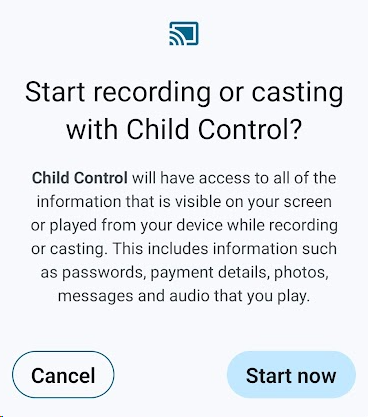
Seeing a lock symbol? #
Seeing a lock symbol instead of a screenshot? This means Android could not take a screenshot of the current app. This is a (deliberate) security measure by Android, often with banking apps. Manual screenshots directly on the device are also not possible with such apps.
Requests appear too often? #
After each device restart or app update, the permission for screen sharing must be granted again on Android devices. On newer devices (e.g. Samsung or Pixel with Android 16), the confirmation may also be required after waking up from standby. If the screen sharing prompt appears too frequently, it can be reduced through a setting in the Developer options:
- Enable Developer options: In Settings → About phone → Software information (names may vary by manufacturer), tap Build number seven times.
- Open Developer options: A new menu item Developer options will now be available in the main Settings menu.
- Under the Apps section, enable the switch Disable screen sharing protection.
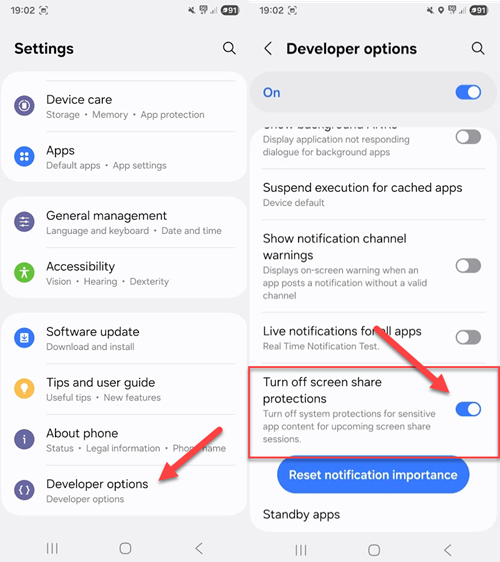
Thanks to our customer RV for this helpful tip!
Windows #
Black screen? #
If your Windows screenshot shows a black screen, it’s likely that a game using its own graphics and video drivers is active. In this case, the parental control cannot create a screenshot.
User assignment #
On Windows systems, screenshots currently cannot be assigned to individual users on the child’s PC. If the PC is used by multiple children, you can only check the “Logs” section to see who was using the device at that time (and who the screenshots might belong to).